Work order and field service software
Work orders, technician schedule, client equipment, warranties and maintenance contracts in one place. Built for service at the client's address, not for car workshops.
MetaBlink Field Service is cloud-based software. You open it in a browser, on a computer in the office or on a phone in the field, with nothing to install.
We will reply with a time for the demo.
- Cloud-based, nothing to install
- Phone access through the browser
- Integrates with your existing systems for automation
Sound familiar?
- Work orders on paper, appointments in WhatsApp.
- Warranties and maintenance contracts in Excel, equipment in a notebook.
- Nobody knows for sure who is at which client or whether the order is signed.
MetaBlink Field Service keeps all of it in one system that the office and the technicians open in a browser.
Work orders from request to signature
Every service job gets its own order: client, site, equipment, technician, time slot and activities. The order status shows where the job stands, and the client confirms the work with a signature at the end.
- Order statuses and a list of all orders on one screen
- Activities and time spent on the order
- Client e-signature
- PDF work order
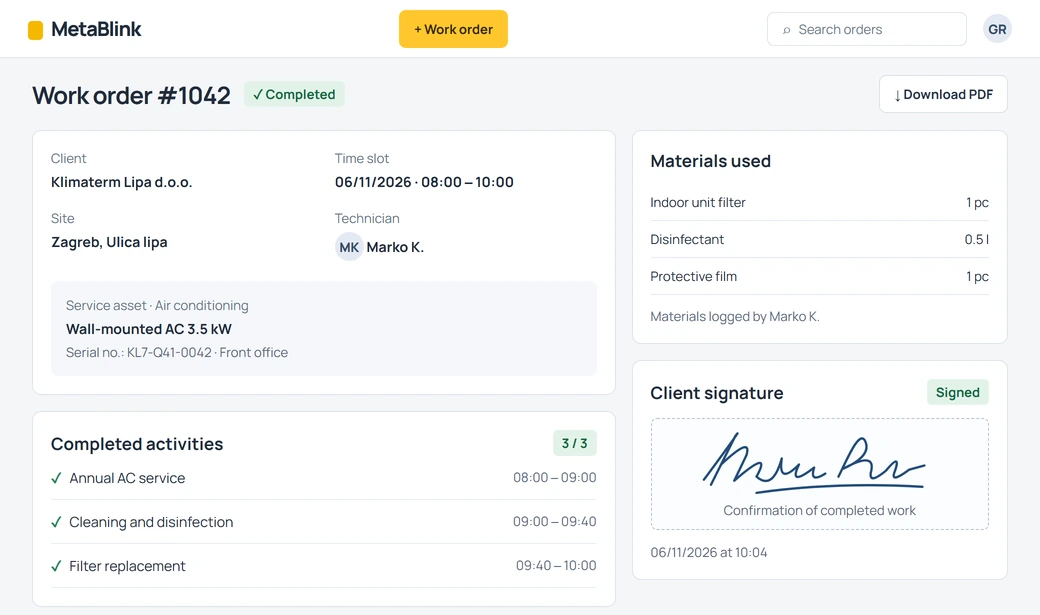
- Client, site and time slot
- Order status
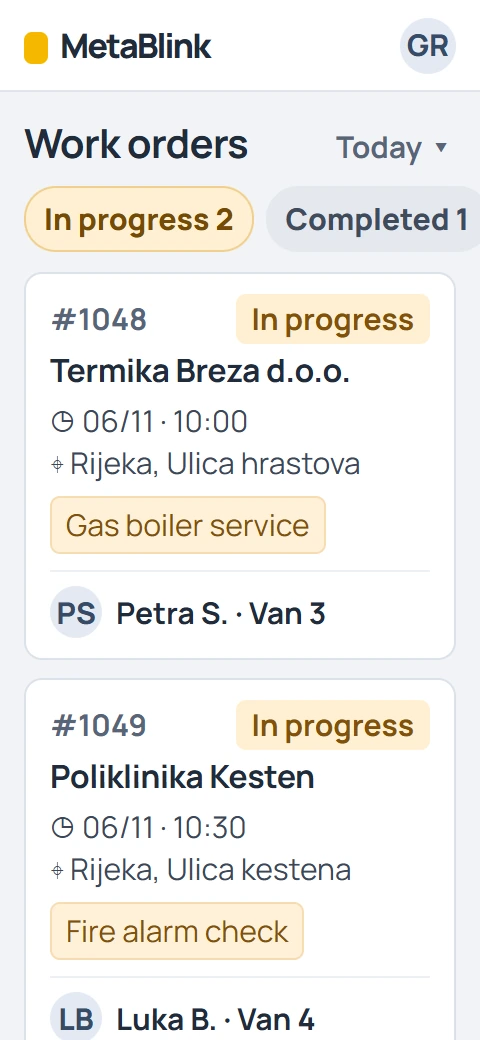
What is a work order
A work order, in service work also called a service order, is the record of one service job: who the client is, where the work happens, which equipment is serviced, who services it and when, what was done, and whether the client confirmed it. A digital work order keeps all of that in one place instead of on paper, in Excel or in messages.
Three steps
- Open the order. Enter the client, site, equipment, technician and time slot.
- The technician does the job. Activities and time are recorded on the order, and the status changes as the job progresses.
- The client signs. The signature is stored on the order, and you can download the order as a PDF.
Service calendar and Kanban
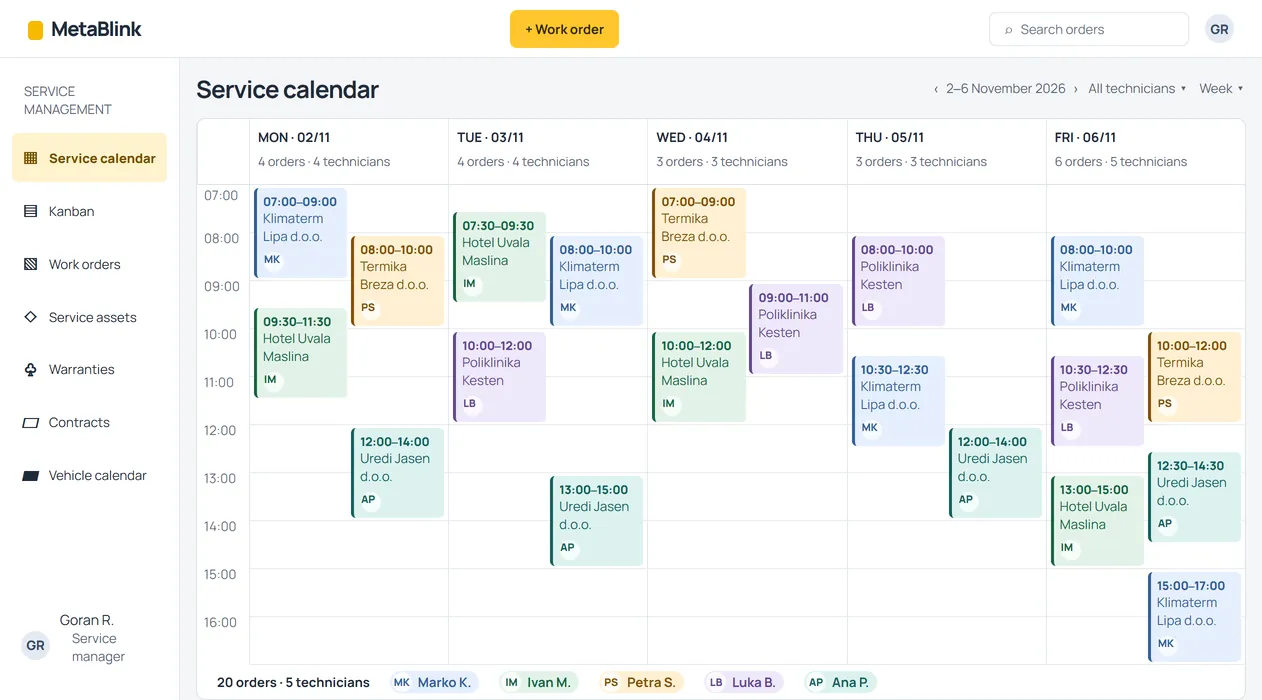
See who is where and what comes next, for the whole week and by status.
Calendar per technician
The weekly calendar shows orders in each technician's column, so the dispatcher sees the crew's workload and free slots.
Kanban by status
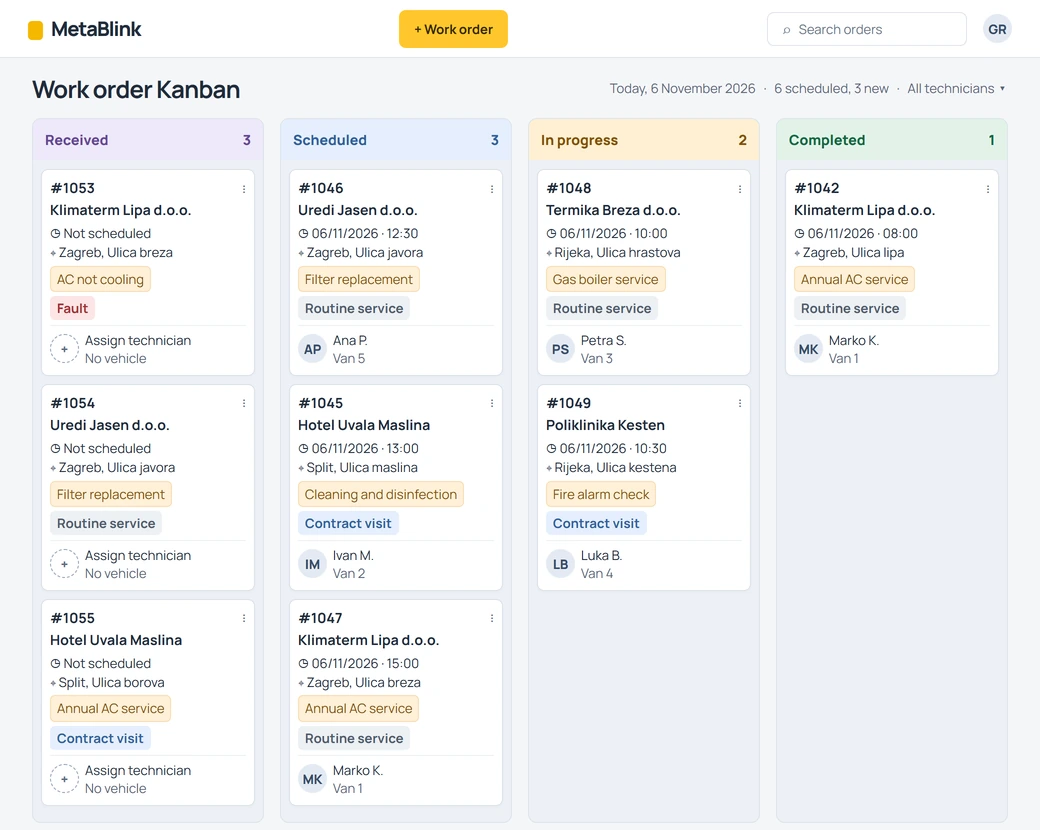
The Kanban board arranges orders by status, from received to signed, so it is clear at a glance what is waiting, in progress and done.
Service objects: equipment per client and site
Every device you service is recorded as a service object: type, model, serial number and year, together with the client and the site where it stands. The order is linked to the object, so the same details are not typed again.
- Device model, serial number and year
- Equipment grouped by client and site
- Object selected on the order
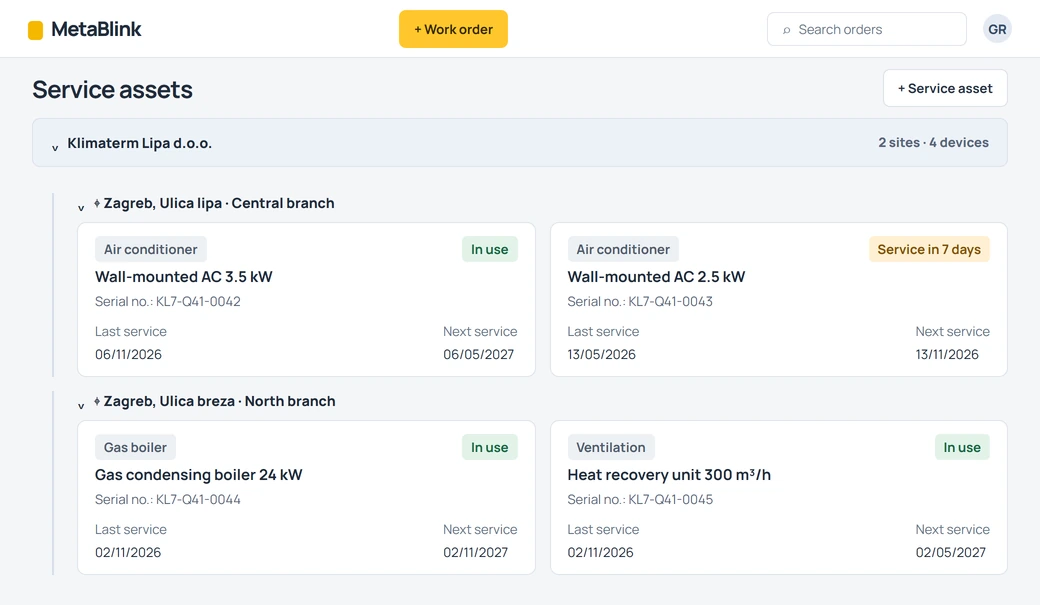
- Client and site
- Model and serial number
Warranties and maintenance contracts
Warranties
Warranty records per device and client: purchase date and warranty period in one place, no digging through paperwork.
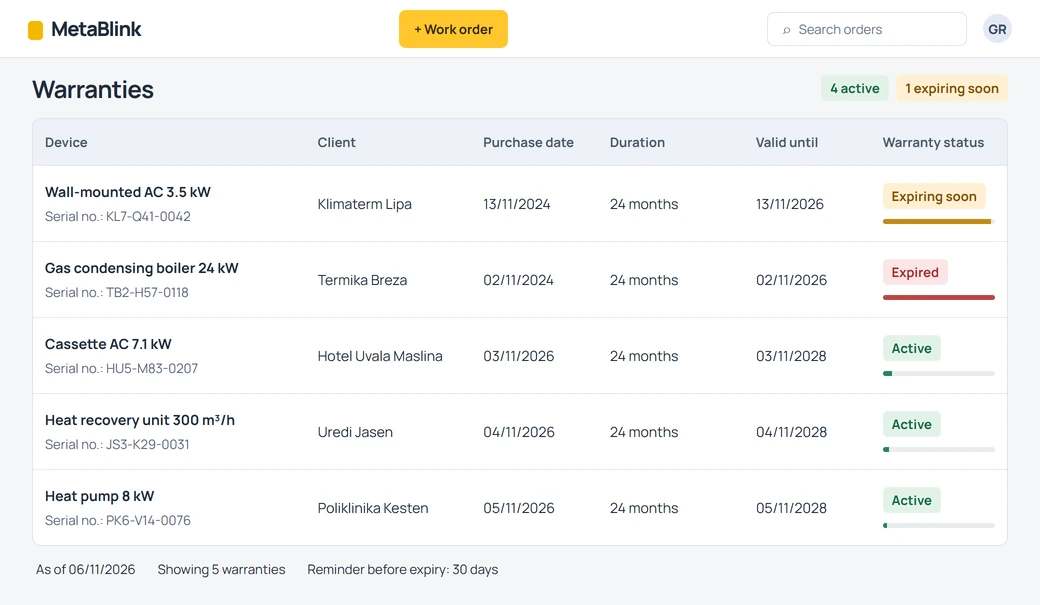
- Purchase date
- Warranty period
Maintenance contracts
Maintenance contracts are recorded per client with their covered sites, so it is clear which client has a contract and where it applies.
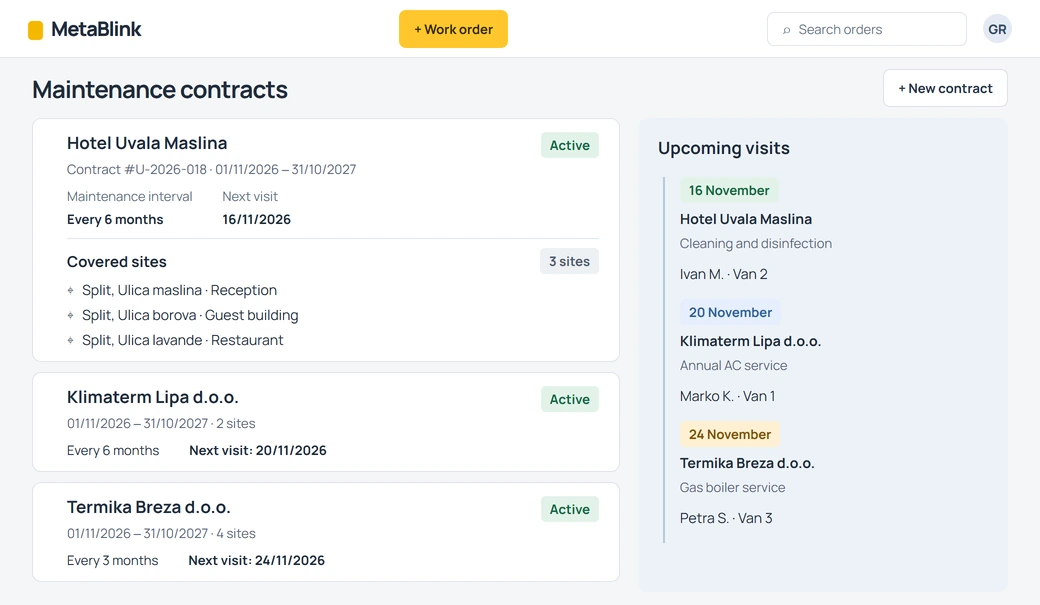
- Client
- Covered sites
Vehicles and crew schedule
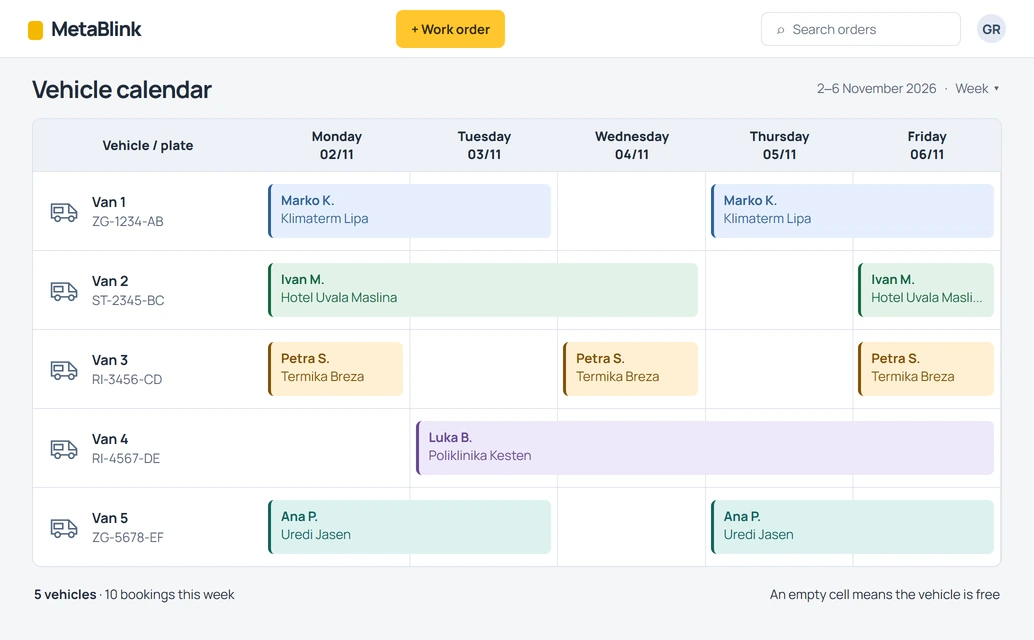
Vehicle calendar
The vehicle calendar shows which vehicle is on which job on a given day, so the fleet is planned alongside the orders.
Technicians and absences
The list of technicians and the record of absences live in the same system as the orders.
Which companies MetaBlink Field Service is for
For companies whose technicians work at the client's address: in homes, office buildings, shops, hotels and plants. From small teams with two technicians to companies with several crews and vehicles, they share the same picture: many devices at many clients, a field schedule and orders the client has to confirm.
Air conditioning installation and service companies
Seasonal peaks, many indoor and outdoor units at the same client, regular cleaning and service. Every unit keeps its own history, so the technician knows what was done last time.
In the application you manage:
- units as service objects with model and serial number
- an order for installation, service or call-out
- a warranty per device
Gas boiler and heating service companies
Annual service visits for homes and business premises, urgent call-outs in the heating season and appliances under manufacturer warranty. The technician schedule is visible by day and the order stays recorded with the appliance.
In the application you manage:
- boilers per client and address
- maintenance contracts with covered sites
- the technician schedule in the calendar
Heat pump and solar heating companies
Installation, commissioning and regular maintenance of systems at the client's site. The model, year and warranty stay with the device, so every next visit is easier to plan.
In the application you manage:
- devices with year and warranty
- an order for commissioning and service
- the client's signature on the order
Fire extinguisher and hydrant service companies
Dozens of extinguishers at one site, periodic inspections and a record the client signs. Extinguishers are listed per client and site, and the order downloads as a PDF.
In the application you manage:
- extinguishers and hydrants per client site
- an order with signature and PDF
- maintenance contracts per client
Fire alarm and security system companies
Fire alarms, intruder alarms, CCTV and access control need regular maintenance and a fast response to faults. The maintenance contract and order history sit with the client.
In the application you manage:
- panels, cameras and sensors as service objects
- maintenance contracts with covered sites
- a Kanban board of call-outs by status
Elevator service and maintenance companies
Every elevator stands at a specific site, has a maintenance contract and regular inspections. The dispatcher sees in the calendar who visits which building.
In the application you manage:
- elevators as objects at the client's site
- maintenance contracts
- an order with signature for every visit
Garage, industrial and automatic door companies
Garage and sectional doors, barriers, automatic sliding doors and drives. Every drive has a model and serial number, with its warranty and service history next to it.
In the application you manage:
- doors and drives as service objects
- warranties per device
- an order with the client's signature
Commercial refrigeration companies
Display cabinets, cold rooms and refrigeration units in shops, restaurants and hotels. Faults must be fixed fast, and one client often has several sites with many units.
In the application you manage:
- units across sites of the same client
- a Kanban board of orders by status
- activities and time on the order
Ventilation and heat recovery companies
Air handling units, heat recovery units and extraction systems in office buildings and plants, with regular filter changes and cleaning.
In the application you manage:
- units per building and site
- maintenance contracts
- an order with activities and signature
Solar PV installation and maintenance companies
Installation and maintenance of solar plants on homes and commercial roofs. Inverters and panels are recorded per site, with warranties in one place.
In the application you manage:
- inverters as service objects
- warranties and device years
- crew and vehicle schedule
EV charging station installation and maintenance companies
Charging stations at companies, in garages and in car parks. Every charging station has its site, model and serial number, and every call-out is recorded on an order.
In the application you manage:
- charging stations per client site
- maintenance contracts
- an order with signature and PDF
Professional catering equipment companies
Coffee machines, dishwashers, combi ovens and ice machines in cafés, restaurants and hotels. The client has many devices and service has to be quick.
In the application you manage:
- devices per client venue
- warranties per device
- the technician calendar
Water treatment equipment companies
Water softeners, filters and water dispensers at homes and companies, with regular service and replacement of consumables.
In the application you manage:
- devices per client and address
- an order for every visit
- maintenance contracts
Generator and UPS companies
Generators and UPS systems in hospitals, data centres and office buildings, where maintenance is contracted in advance.
In the application you manage:
- generators and UPS as service objects
- maintenance contracts with covered sites
- an order with activities and time
Home appliance repair companies
Washing machines, dryers, fridges and cookers in clients' homes, often under warranty. In the field the technician sees the order, address and device on a phone.
In the application you manage:
- devices with warranty and purchase date
- the technician schedule by day
- the client's signature on a phone
Your trade is not on the list? If your technicians work at client sites, get in touch and we will show you in the demo how it looks in the application. Request a demo
Frequently asked questions
What is a work order and what does it contain?
A work order is the record of one service job. It usually contains the client, site, equipment, technician, time slot, activities performed and the client's confirmation. In MetaBlink Field Service you manage the order digitally, with status, activities, time, client signature and a PDF.
Is a work order the same as a service order?
In service practice the two terms are mostly used interchangeably. We use the term work order.
What is service management software for?
It answers who services whom, when and where, what was done and what the client signed. Instead of paper, Excel and messages, orders, the technician schedule, equipment, warranties and maintenance contracts live in one system.
Is MetaBlink Field Service software for car workshops?
No, it is made for service at the client's site: air conditioners, boilers and heat pumps, fire protection and security systems, elevators, doors, refrigeration, ventilation, solar plants, EV charging stations, catering equipment and similar devices. The vehicles in the system are your technicians' vehicles, not clients' cars.
Does it work on a phone?
Yes, you access the system from a phone through the browser. There is nothing to install and no app store. The system is cloud-based, so an internet connection is needed to work.
Can a client sign an order digitally?
Yes, the client's signature is recorded on the order and you can download the order as a PDF. We do not assess the legal validity of a signature in a particular case here; please ask your legal adviser.
Can I keep warranties and maintenance contracts per client and device?
Yes, warranties and maintenance contracts are recorded in the system, with the client and covered sites.
Is there free work order software?
Free tools exist, such as Excel or simple apps, and they can be enough for very small volumes. MetaBlink Field Service is a system for companies that need a technician schedule, equipment, warranty and contract records and signed orders in one place. We agree terms and pricing during the demo.
Which trades is it suitable for?
For service at the client's site, for example air conditioning, heating and heat pumps, fire protection and security systems, elevators, doors and gates, commercial refrigeration, ventilation, solar PV, EV charging stations, catering equipment, water treatment, generators and UPS, and home appliances. If you service something else, get in touch and we will show you in the demo how it looks in the system.
Is Field Service part of the MetaBlink platform?
Yes, Field Service is part of the MetaBlink platform, alongside MetaBlink Booking for appointment scheduling. It can be integrated with your existing system for automation, and we will show you in the demo how that would look for you.
Request a demo
Tell us how you manage work orders today. We will reply with a time for the demo.
What we will show you:
- the service calendar
- work orders with signature
- service objects
- warranties and maintenance contracts
Have a question? See the FAQ